KDP Interior Teacher Planner Interior: A Practical Guide to Customization and Quality
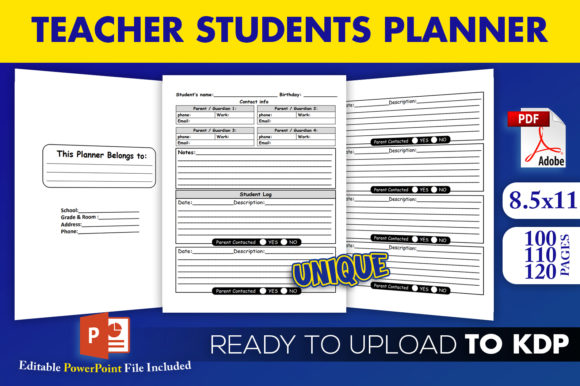
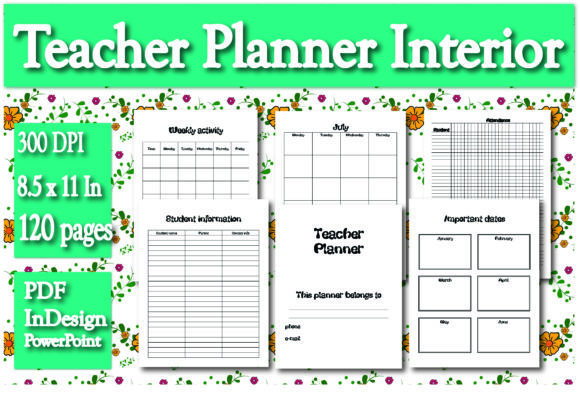
Creating a successful low-content or medium-content book on Amazon KDP requires more than just uploading a generic template; it demands a strategic approach to utility and design. The KDP Interior Teacher Planner Interior serves as a foundational asset for publishers, educators, and entrepreneurs looking to enter the academic niche. This specific 120-page resource, sized at the industry-standard 8.5 x 11 inches, offers a comprehensive structure including undated monthly planners from July to June, weekly activity logs for 52 weeks, grade tracking, attendance records, student information tables, and lined note pages. However, possessing the file is only the first step. The difference between a bestseller and a returned product often lies in how the creator evaluates, customizes, and prepares this interior before publication.
Evaluating File Formats Beyond the PDF
A common oversight among new KDP publishers is treating the ready-to-upload PDF as the final product rather than a proof copy. While this pack includes a print-ready PDF, relying solely on it limits your ability to differentiate your product in a saturated market. The true value of this planner lies in the inclusion of both InDesign and PowerPoint source files. Neglecting these editable formats is a significant missed opportunity.
When you upload a stock PDF without modification, you risk publishing a duplicate that offers no unique value proposition to teachers. Educators are discerning buyers who look for specific layouts that match their grading systems or school calendars. By ignoring the InDesign or PowerPoint files, you forfeit the chance to add branding, adjust column widths for specific grade books, or include localized holiday dates. Always open the source files first. Use PowerPoint if you need quick, accessible edits like changing fonts or adding a logo. Reserve InDesign for structural changes, such as adjusting margins, modifying table grids, or altering the master pages to ensure consistent styling throughout the 120 pages.
Understanding the Undated Calendar Structure
Misunderstanding the "undated" nature of the monthly planner section can lead to poor customer reviews. This interior covers the academic year from July to June but does not have pre-printed dates. Some creators mistakenly assume they must manually type in dates for the current year before uploading. While this creates a dated version, it also creates an expiration date for your inventory. If the book does not sell by August, it becomes obsolete.
A better approach is to leverage the undated format as a feature, not a limitation. Market the planner as a reusable tool that allows teachers to start at any time or use it across multiple years. If you do choose to add dates, consider creating multiple editions (e.g., "2024-2025 Edition") using the editable files, but keep the master undated version live as an evergreen product. Additionally, verify that the 52 weeks of activity logs align logically with the undated monthly spreads. Teachers need to see that the weekly views correspond effectively to the monthly overviews without awkward gaps or overlaps.
Verifying Table Functionality and Usability
Tables for important dates, student information, attendance, and grades are the functional core of this planner. A frequent mistake is assuming these tables are universally applicable without testing. Standardized table sizes may not accommodate larger class rosters or specific grading scales used in different regions. For example, a grade table designed for percentage-based scoring may be useless for a teacher using standards-based grading or letter grades with plus/minus modifiers.
Before finalizing your KDP Interior Teacher Planner Interior, print a test page of each table type at actual size. Check the writing space. Is there enough room to handwrite thirty student names? Are the attendance boxes large enough to mark clearly without bleeding into adjacent cells? If the answer is no, use the InDesign file to adjust row heights or reduce the number of rows per page. It is better to have fewer entries per page with adequate writing space than a cramped table that frustrates the user. Usability testing prevents negative feedback regarding "tiny text" or "insufficient space," which are common complaints in this niche.
Optimizing Margins and Bleed Settings
Technical formatting errors remain the primary reason for KDP rejection or poor print quality. Even though this interior is pre-sized at 8.5 x 11 inches, you must verify margin safety based on your binding choices. A standard 120-page paperback requires specific gutter margins to prevent content from disappearing into the spine. If you add content to the inner margins during customization without accounting for the gutter, the tables and notes will be unreadable in the physical book.
Always check the bleed settings if you plan to extend background colors or graphics to the edge of the page. The provided PDF may be set up for no-bleed printing. If you introduce colored headers or full-page backgrounds using the editable files, you must expand the document size by 0.125 inches on the top, bottom, and outside edges. Failing to adjust the canvas size for bleed results in white borders where color should be, or worse, critical content getting trimmed off. Consult Amazon KDP’s current trim size guidelines specifically for 8.5 x 11 books with 120 pages to confirm exact margin requirements before exporting your final PDF.
Strategic Customization for Niche Relevance
Generic teacher planners face stiff competition. To maximize the potential of this interior, avoid the mistake of broad targeting. Instead, customize the content for specific sub-niches using the editable files. A planner tailored for "Special Education Teachers," "Homeschool Organizers," or "Music Instructors" performs significantly better than a general "Teacher Planner."
Use the lined notes pages and weekly activity sections to add niche-specific prompts. For a homeschool planner, replace generic "Student Information" tables with "Curriculum Tracking" or "State Compliance Logs." For a music teacher, adapt the grade table to track instrument proficiency or repertoire. These modifications take minimal time in PowerPoint or InDesign but drastically increase perceived value. When customers see that the interior addresses their specific daily challenges, conversion rates improve. Do not leave the 120 pages as a blank slate; guide the user with relevant headers and structured content that reflects an understanding of their unique workflow.
Final Quality Assurance Checklist
Before hitting publish, conduct a thorough review of your customized KDP Interior Teacher Planner Interior. Verify that all hyperlinks (if digital) work, though for print, focus on visual alignment. Ensure font consistency; mixing too many typefaces when editing in PowerPoint can make the interior look unprofessional. Stick to the original typography hierarchy unless there is a functional reason to change it. Confirm that the page count remains within acceptable limits for your chosen paper type and binding. Finally, order a physical proof. Digital previews cannot replicate the tactile experience of writing in a planner. Feeling the paper weight, checking the opacity of the lined notes pages, and physically writing in the attendance tables are essential steps to ensure the product meets professional standards.
By approaching this resource with a critical eye toward usability, technical specifications, and niche relevance, you transform a standard template into a valuable educational tool. The goal is to provide a seamless organizational experience for teachers, ensuring your publication stands out for its quality and thoughtfulness rather than blending in with generic alternatives.