Streamlining Self-Publishing with a Professional KDP Interior Accounting Ledger
For independent publishers and content creators, the bridge between a creative idea and a tangible product often lies in the technical specifications of the interior file. When creating functional books like financial trackers, business logs, or personal budget journals, precision is not merely a preference; it is a requirement for customer satisfaction. A high-quality KDP Interior Accounting Ledger serves as the foundational template that ensures your published book meets professional standards while providing genuine utility to the end user. Understanding the specific attributes of an 8.5″ x 11″ ledger template can significantly reduce publishing errors and enhance the perceived value of your low-content or medium-content books.
The Strategic Advantage of Standard Letter Size
Selecting the correct trim size is the first critical decision in ledger design. The 8.5″ x 11″ format remains the industry standard for accounting and record-keeping publications for several practical reasons. Unlike smaller journal sizes, this dimension provides ample horizontal space for multiple columns, which is essential for tracking dates, descriptions, debit/credit entries, and running balances. When you utilize a pre-formatted Accounting ledger KDP interior at this size, you are aligning your product with user expectations. Accountants, small business owners, and home budgeters are accustomed to letter-sized documents that fit neatly into standard filing cabinets and desk organizers.
Furthermore, this size offers superior readability. Financial tracking requires visual clarity; cramped columns lead to transcription errors and user frustration. An 8.5″ x 11″ layout allows for generous margins and adequate cell width, ensuring that handwriting remains legible even when users are filling out dense rows of data. For the publisher, this trim size also optimizes printing costs on Amazon KDP, striking a balance between page real estate and spine width calculations.
Technical Precision: Resolution and File Integrity
The difference between an amateur publication and a professional-grade ledger often comes down to file resolution. Blurry lines, pixelated text, or jagged table borders can render an accounting book unusable. This is why sourcing or creating a KDP Interior Accounting Ledger at 300 DPI (dots per inch) is non-negotiable. At this resolution, every line weight and numerical header prints with crisp definition. Lower resolutions may appear acceptable on a computer screen but frequently degrade during the offset printing process, resulting in grayish blacks and indistinct grid lines.
A high-resolution PDF ensures that the contrast remains sharp against the white paper stock used by KDP. Since accounting ledgers rely heavily on structure, the integrity of those structural elements must be preserved from digital file to physical copy. When evaluating a template package, verifying the 300 DPI specification protects your brand reputation and reduces the likelihood of negative reviews related to print quality.
Understanding No-Bleed Specifications for Ledgers
One of the most common points of confusion for new KDP publishers is the concept of bleed versus no-bleed. For an Accounting ledger KDP interior, a no-bleed configuration is typically the superior choice. Bleed is necessary when images or colors extend to the very edge of the page, requiring the printer to trim off excess ink. However, functional ledgers require safe zones. Users need margin space to write notes, punch holes for binders, or simply hold the book without obscuring data.
A no-bleed 8.5″ x 11″ PDF keeps all content within a defined safe area, usually maintaining at least a 0.25″ to 0.5″ margin on all sides. This specification simplifies the upload process significantly. KDP’s automated review system flags fewer errors with no-bleed interiors because there is no risk of critical content being trimmed away. Additionally, this format ensures consistency across different print facilities. By keeping the ledger grid centered and contained, you guarantee that the writing space remains uniform regardless of minor manufacturing variances.
Optimizing Page Count for Utility and Value
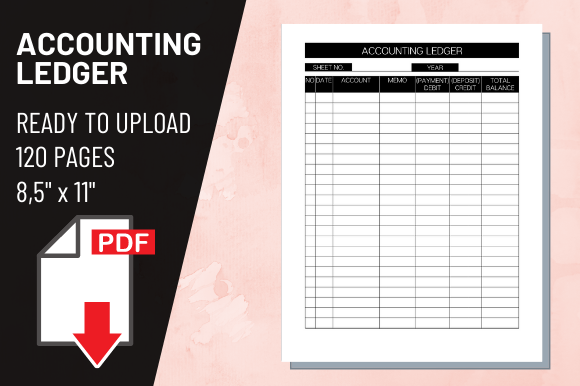
The 120-page count included in many premium ledger packages is not arbitrary; it represents a strategic sweet spot for financial record-keeping. In accounting workflows, consistency matters. A 120-page book provides sufficient capacity for quarterly tracking, monthly expense logging, or project-specific budgeting without becoming unwieldy. Thinner books may feel insubstantial and require frequent replacement, while excessively thick volumes can be intimidating and difficult to manage on a desktop.
From a publishing economics perspective, 120 pages generates a spine wide enough to accommodate legible title text, which enhances shelf visibility and discoverability in search results. It also meets minimum page thresholds for certain distribution options. When marketing your KDP Interior Accounting Ledger, highlighting this page count helps potential buyers understand the book’s longevity and practical application. It signals that the tool is designed for sustained use rather than temporary note-taking.
Integrating Ready-to-Upload Files into Modern Workflows
Time efficiency is crucial for self-publishers managing multiple titles or balancing publishing with other business activities. A ready-to-upload PDF eliminates hours of formatting, margin adjustment, and font licensing verification. Instead of building a ledger from scratch in spreadsheet software or design tools, publishers can leverage professionally engineered templates that have already been tested against KDP guidelines. This allows for rapid iteration and testing of different niches within the financial planning category.
Modern workflows benefit from this plug-and-play approach in several ways:
- Rapid Market Testing: Publishers can quickly release variations of accounting ledgers to gauge demand for specific layouts, such as double-entry bookkeeping versus simple expense tracking.
- Brand Consistency: Using standardized 8.5″ x 11″ templates ensures that all books in a series share identical dimensions and quality benchmarks.
- Error Reduction: Pre-validated files minimize rejection notifications during the KDP review process, accelerating time-to-market.
- Cross-Platform Compatibility: High-quality PDFs formatted for KDP can often be adapted for other print-on-demand platforms or direct sales channels with minimal modification.
Evaluating Layout Functionality for End Users
While technical specifications ensure printability, the actual layout determines whether customers will repurchase or recommend your ledger. A well-designed Accounting ledger KDP interior anticipates user behavior. This includes considerations like column width ratios, header placement, and summary sections. For instance, debit and credit columns should be visually distinct from description fields to prevent entry errors. Running balance columns should be positioned logically to facilitate mental math verification.
Publishers should also consider the inclusion of reference pages, index sections, or yearly summaries within the 120-page allocation. These value-add features differentiate generic templates from purposeful financial tools. Even when using a pre-made PDF, understanding these functional elements helps in selecting the right template for your target audience. A ledger designed for personal household budgeting will have different column headers and spacing than one intended for small business inventory tracking, despite both utilizing the same 8.5″ x 11″ no-bleed format.
Quality Assurance Before Publication
Even with a professionally prepared 300 DPI PDF, diligent publishers should implement a verification checklist before final submission. Download KDP’s previewer tool to examine how the KDP Interior Accounting Ledger renders in digital format. Check that margins appear balanced and that no content falls outside the safe zone. Order a proof copy whenever possible to physically test the writing experience. Paper texture, line darkness, and binding flexibility can only be truly assessed through tactile inspection.
This hands-on evaluation reveals insights that digital previews cannot. You might discover that certain line weights are too faint for pencil notation or that the gutter margin needs adjustment for comfortable writing near the spine. Investing this time upfront prevents costly reprints and protects your author brand. Remember that in the competitive landscape of low-content publishing, quality is the primary differentiator. A meticulously verified ledger demonstrates respect for the customer’s financial organization needs and establishes credibility in a niche where accuracy is paramount.
Ultimately, success in publishing accounting ledgers hinges on the intersection of technical excellence and user-centered design. By prioritizing proper dimensions, resolution standards, and functional layouts, publishers create products that serve genuine purposes. The 8.5″ x 11″ no-bleed format with 120 pages at 300 DPI represents a proven configuration that balances production requirements with practical utility. Whether you are expanding an existing catalog or entering the financial planning niche for the first time, starting with a robust template foundation allows you to focus on what matters most: delivering reliable tools that help others achieve financial clarity.