KDP Weekly Planner - Bleed No Bleed: Optimizing Layout for Production and Personal Workflow
Creating a functional weekly planner for Amazon KDP requires balancing aesthetic appeal with strict technical specifications. The KDP Weekly Planner - Bleed No Bleed template addresses the most common friction point for low-content book publishers: formatting margins correctly while maintaining a professional interior layout. This resource is not merely a collection of pages; it is a pre-engineered workflow solution designed to streamline the publishing process for entrepreneurs, educators, and productivity enthusiasts. By providing two distinct trim size options with pre-configured settings, this template eliminates the guesswork involved in gutter margins, safe zones, and bleed allowances, allowing creators to focus on niche research and marketing rather than graphic design troubleshooting.
Understanding Technical Specifications and Trim Size Options
The decision between bleed and no-bleed formats dictates the entire production pipeline of a KDP paperback. This template package includes both variations to accommodate different design philosophies and market preferences. Understanding when to deploy each version is critical for quality control and customer satisfaction.
Option 1: With Bleed (6.125 x 9.25)
The bleed version is sized at 6.125 x 9.25 inches to account for the extra 0.125 inches required on the top, bottom, and outside edges. This option features a dark background, which necessitates bleed settings to prevent white borders from appearing after trimming. Dark backgrounds create a premium, high-contrast aesthetic that appeals to professionals and creatives seeking a sophisticated look. However, this format requires precise alignment during the upload process. Publishers must ensure that all critical text and daily note sections remain within the safe zone to avoid being cropped during manufacturing. This version is ideal for niches where visual impact drives purchasing decisions, such as wellness journals, executive planners, or artistic tracking logs.
Option 2: No Bleed (6 x 9)
The no-bleed version adheres to the standard 6 x 9 inch trim size with a plain background. This is the safer, more traditional route for text-heavy planners or minimalist designs. Because the content does not extend to the edge of the page, there is zero risk of vital information being trimmed off. This format is often preferred for academic planners, habit trackers, and business organizers where clarity and readability take precedence over decorative elements. For new publishers or those creating high-volume series, the no-bleed option reduces the likelihood of printing errors and rejection notifications from KDP’s automated review system.
Integrating the Planner Structure into Daily Workflows
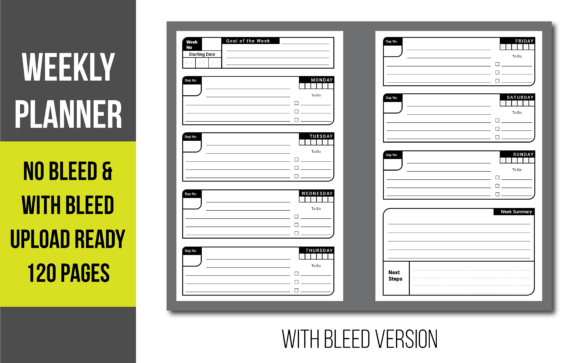
A planner fails if it does not align with how users actually manage their time. The KDP Weekly Planner - Bleed No Bleed is structured around a face-by-face spread that mirrors natural cognitive processing. This layout supports a comprehensive workflow that moves from macro-level strategy to micro-level execution.
Weekly Goal Setting as a Pre-Task Filter
Before a user engages with daily tasks, they interact with the separate weekly goal setting section. In a practical workflow, this acts as a strategic filter. Users define three to five non-negotiable outcomes before the week begins. This prevents the "busy work" trap where individuals complete many tasks but fail to advance major projects. For entrepreneurs and freelancers using this planner, this section serves as an anchor. When mid-week chaos ensues, the weekly goals provide a reference point to recalibrate priorities. Publishers should emphasize this feature in their book descriptions, positioning the planner as a strategic tool rather than just a place to record appointments.
Face-by-Face Execution and Daily Notes
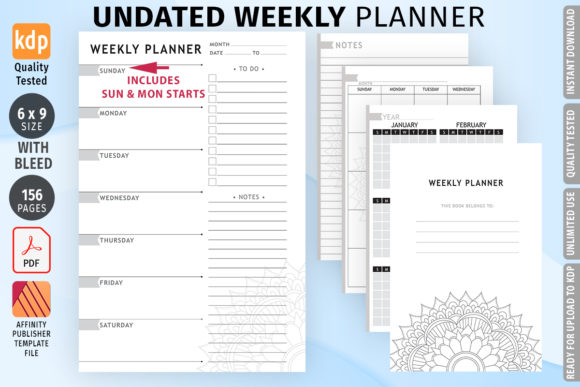
The core utility lies in the face-by-face pages. Having the full week visible simultaneously allows for better resource allocation than a single-page-per-day format. Users can visually assess workload distribution across seven days. The integrated daily note section provides necessary overflow space for meeting minutes, creative ideas, or contextual information that doesn't fit into a checkbox. This reduces the need for external sticky notes or digital apps, keeping the physical planner as the central source of truth. For students and educators, this layout supports blocking study sessions alongside assignment deadlines, facilitating a holistic view of academic responsibilities.
Daily To-Do Lists and Tactical Action
The daily to-do list section bridges the gap between intention and action. Unlike generic lined paper, dedicated task spaces encourage specificity. Effective users leverage this area by migrating unfinished tasks from previous days or breaking down larger weekly goals into actionable steps. This section interacts directly with time-blocking methods. A user might assign specific hours to tasks listed here, turning a static list into a dynamic schedule. For marketers and content creators, this is where campaign milestones are tracked against daily output, ensuring consistent progress toward quarterly targets.
Week Summary and Retrospective Analysis
Productivity is iterative. The separate week summary section facilitates a retrospective review that is often missing in standard commercial planners. At the end of the week, users document wins, identify bottlenecks, and adjust strategies for the upcoming cycle. This transforms the planner from a passive recording device into an active coaching tool. For business owners, this section captures data on operational efficiency. For personal development users, it reinforces habit formation through reflection. Publishers can enhance the value of their KDP books by including prompts or questions in this section to guide the user’s review process.
Implementation Tips for Publishers and Creators
Leveraging the KDP Weekly Planner - Bleed No Bleed effectively requires attention to detail during the setup and listing phases. The following considerations ensure a smooth integration into your publishing workflow.
- File Verification: Always download the 2x120 Pages PDF and open it in professional software like Adobe Acrobat or Affinity Publisher before uploading. Verify that the bleed version measures exactly 6.125 x 9.25 and the no-bleed version is 6 x 9. Do not assume the file is correct; manual verification prevents costly proofing delays.
- Scalability and Customization: The fully scalable nature of these PDFs allows for minor adjustments. If targeting a specific niche like teachers or nurses, consider adding a small header or footer with relevant terminology. However, maintain the core structural integrity of the goal, task, and summary sections, as these are the primary selling points.
- Cover Design Alignment: Ensure your cover design matches the interior choice. If using the dark background bleed interior, the cover should complement this aesthetic with appropriate spine width calculations for the 6.125 x 9.25 size. Mismatched interiors and covers lead to negative reviews regarding product consistency.
- Keyword Strategy: When listing, describe the planner’s functionality using process-oriented language. Instead of just "weekly planner," use terms like "goal-oriented weekly system," "productivity workflow journal," or "strategic planning notebook." This attracts buyers looking for solutions to specific organizational problems.
Compatibility with Digital and Analog Ecosystems
Modern productivity rarely relies on a single tool. This planner is designed to coexist with digital ecosystems rather than replace them. Users often employ digital calendars for time-sensitive appointments and project management software for team collaboration. The physical planner excels at capturing deep work priorities and personal reflections that digital tools often obscure. The daily note section serves as a rapid capture mechanism for ideas that arise during offline work, which can later be migrated to Notion, Trello, or Asana. This hybrid approach maximizes the strengths of both mediums. For publishers, highlighting this compatibility broadens the potential audience to include tech-savvy professionals who still value tactile planning.
Quality Control and Long-Term Usability
The longevity of a planner depends on paper quality and binding, factors influenced by the initial file setup. The 120-page count strikes an optimal balance between durability and portability. It is thick enough to feel substantial but thin enough to carry daily. When using the dark background bleed version, be aware that KDP’s standard color paper may show some transparency. Testing a proof copy is mandatory to ensure the dark backgrounds do not bleed through to the reverse side, obscuring the daily to-do lists. For the plain background version, standard white paper typically performs well with minimal ghosting. Consistency in usage is driven by the planner’s reliability; if the physical product fails, the user abandons the system. Therefore, treating the technical specifications of the KDP Weekly Planner - Bleed No Bleed with rigor is essential for building a sustainable brand in the low-content book market.
Ultimately, this template serves as a foundational asset for both the publisher and the end-user. It removes technical barriers to entry for creators while providing a validated structure for individuals seeking to organize their lives. By respecting the distinctions between bleed and no-bleed formats and understanding the behavioral psychology behind the layout sections, publishers can deliver products that genuinely assist users in achieving their goals. The result is a higher quality catalog, fewer returns, and a reputation for producing tools that facilitate real-world execution.