Evaluating KDP Interior Medication Tracker Templates for Custom Publishing
Creating a successful low-content or medium-content book on Amazon KDP often hinges on the balance between production speed and product quality. For publishers targeting the health and wellness niche, a KDP Interior - Medication Tracker represents a specific functional tool designed to solve a daily problem for end-users. Unlike generic journals, medication trackers require precise formatting, clear data tables, and legible typography to be useful. Evaluating template files that include PowerPoint, Word, and Excel source materials alongside print-ready PDFs offers a distinct advantage for creators who wish to customize their interiors without starting from scratch.
Understanding the KDP Interior Medication Tracker Format
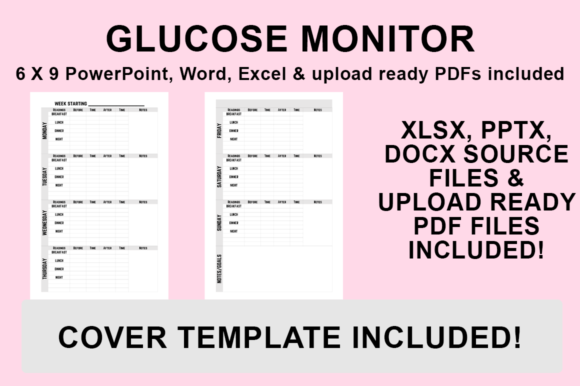
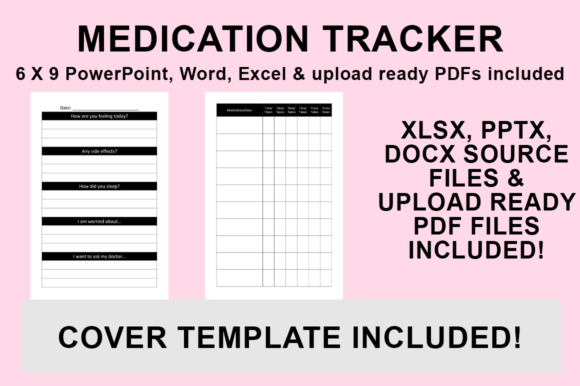
A KDP Interior - Medication Tracker is more than a simple log; it is a structured document intended to help individuals manage prescriptions, dosages, and medical schedules. When evaluating template packages, it is essential to understand that these files are typically engineered for the 6″x9″ trim size with no bleed. This specification is critical for KDP compliance, as margins and safe zones differ significantly between bleed and non-bleed formats. The inclusion of multiple source file types—PowerPoint, Word, and Excel—acknowledges that different publishers have varying workflows and software proficiencies.
The core value proposition of these templates lies in their editability. While a pre-made PDF allows for immediate upload, the source files enable publishers to alter fonts, adjust column widths, add branding graphics, or modify tracking fields to suit specific sub-niches, such as elderly care, post-surgery recovery, or veterinary medication logs. This flexibility transforms a generic asset into a proprietary product, which is increasingly important in a marketplace saturated with identical stock interiors.
Benefits of Multi-Format Source Files
The decision to utilize editable source files rather than static PDFs involves weighing the initial time investment against long-term product differentiation. There are several practical benefits to this approach:
- Typography Control: Medical trackers must prioritize readability over aesthetic flair. Access to Word and PowerPoint files allows publishers to select high-legibility fonts appropriate for older demographics or those with visual impairments, ensuring the final product is genuinely usable.
- Niche Adaptation: A standard tracker may not fit every need. Excel files are particularly valuable for restructuring data tables. Publishers can add columns for side effects, refill dates, or doctor contact information without manually redrawing lines in a design program.
- Brand Consistency: Adding custom headers, footers, and logos helps build a recognizable series. Editable templates allow for the seamless integration of these elements across multiple books, fostering brand loyalty among buyers.
- Cost Efficiency: Hiring a designer to create a custom interior from scratch can be cost-prohibitive for low-content books. These templates bridge the gap between expensive custom design and low-quality free resources.
Tradeoffs and Technical Considerations
While customizable templates offer significant advantages, they also introduce variables that require careful management. Publishers must consider the technical learning curve associated with each file type. PowerPoint is often preferred for layout design due to its drag-and-drop interface, but it requires attention to slide sizing to match the 6″x9″ requirement. Word is excellent for text-heavy pages but can be temperamental when managing complex table structures across many pages. Excel provides superior data organization but requires formatting adjustments to ensure it prints correctly within KDP’s margin constraints.
Furthermore, the "no bleed" specification demands vigilance. Any customization that pushes content too close to the edge of the page risks rejection during the KDP review process. Publishers must verify that their modifications respect the safe zone margins inherent in the original template. Additionally, while changing fonts and graphics is encouraged, users must ensure they possess the commercial licensing rights for any new assets they introduce into the design.
Situational Fit: When to Choose Customizable Templates
Determining whether a KDP Interior - Medication Tracker template aligns with your goals depends on your current position in the publishing lifecycle. These resources are particularly well-suited for:
- Publishers Building a Series: If you plan to release multiple health-related planners, the ability to maintain consistent styling while tweaking internal layouts is invaluable.
- Niche Specialists: Creators focusing on specific medical conditions (e.g., diabetes management, anticoagulant therapy) will find generic trackers insufficient. The ability to modify field labels makes these templates a strong fit.
- Design-Capable Beginners: Individuals with basic proficiency in Office suite software who want to avoid the complexity of professional tools like Adobe InDesign will find this workflow accessible.
When Alternatives May Be Preferable
Despite their utility, editable templates are not the optimal solution for every scenario. Publishers should consider alternatives in the following situations:
- Zero Customization Intent: If you intend to upload the file exactly as provided without modification, purchasing a pre-formatted, KDP-approved PDF from a reputable creator may save time and reduce the risk of formatting errors.
- Complex Design Requirements: If your vision involves intricate illustrations, full-bleed artwork, or non-standard trim sizes, Office-based templates may be too limiting. Professional design software or hiring a freelancer would be more appropriate.
- Lack of Software Access: These templates rely on Microsoft Office compatibility. Users relying exclusively on open-source alternatives like LibreOffice may encounter formatting shifts that render the files unusable without extensive reformatting.
Practical Workflow for KDP Export
For those proceeding with customizable templates, establishing a reliable export workflow is essential for maintaining quality. The process of converting your edited source file into a KDP-ready PDF is straightforward but requires precision. After making desired changes to fonts, formatting, and graphics, navigate to the ‘File’ menu and select ‘Save As.’ It is crucial to choose the PDF format specifically from the ‘Save as type’ dropdown rather than using a third-party converter, as native exports generally preserve font embedding and dimensions more reliably.
Before uploading, always verify the exported PDF’s page size matches the 6″x9″ specification and that all content remains within the safe zone. This step prevents common rejection reasons related to margin violations. By treating the template as a foundation rather than a finished product, publishers can create medication trackers that offer genuine value to users while distinguishing their catalog in a competitive marketplace.