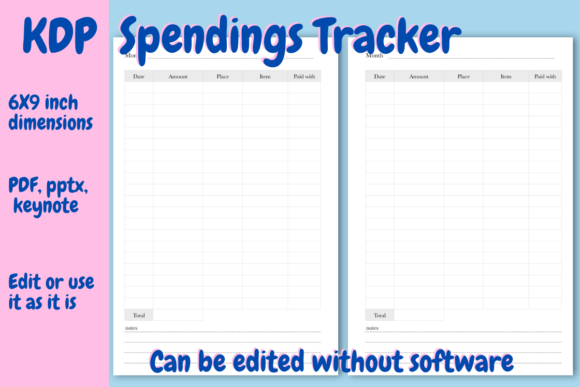
Spendings Tracker for KDP: A Practical Tool for Low-Content Publishers
Creating a successful low-content book on Amazon KDP often comes down to solving a specific problem with a functional interior. The Spendings Tracker for KDP is designed to do exactly that by providing a ready-to-publish financial logging tool. This resource is not just a collection of blank tables; it is a pre-formatted template available in PDF, PPTX, and Keynote formats that streamlines the publishing process. For creators who want to add a practical finance journal to their catalog without spending weeks designing grids, this tracker offers an immediate solution. It bridges the gap between having an idea for a budget planner and actually getting a professional-quality file uploaded to KDP.
Understanding the Interior Structure and Layout
Functionality drives sales in the low-content niche, and the layout of this Spendings Tracker for KDP reflects real-world usage. The document contains 120 pages in total, optimized for the standard 6x9 inch trim size. The core of the journal consists of 114 dedicated spendings tracker pages. Each page features a structured table with space for 20 individual entries, including columns for date, amount spent, place, and item description. Crucially, each table includes a calculated total amount at the bottom and four lines for notes, allowing users to add context to their expenses rather than just recording numbers.
Beyond the daily tracking pages, the interior includes three lined pages at the end for extra notes or monthly summaries. The front matter is equally prepared for publication, featuring a title page and a copyright page where you simply insert your brand name. Because this document has been tested on the KDP previewer, you can avoid common formatting errors like margin violations or bleed issues that frequently plague new publishers. The structure is intentional, balancing writing space with portability in a size that fits easily into a bag or glove compartment.
Editing Without Expensive Software
One of the most significant barriers to entry for KDP creators is the cost and learning curve of design software. This Spendings Tracker for KDP removes that friction entirely. While the files are provided in PDF, Keynote, and PowerPoint formats, the PPTX file was specifically formatted in Google Slides. This means you do not need to purchase Microsoft Office or subscribe to Adobe Creative Cloud to customize the interior.
If you have a free Gmail account, you can upload the PPTX file directly to Google Drive and open it with Google Slides. From there, editing is straightforward. You might want to change the font to match your cover design, adjust column widths, or add a motivational quote to the header. Once your edits are complete, you simply download the file as a PDF, and it is ready for upload. This accessibility makes the template viable for educators, students, and hobbyists who may not have professional design backgrounds but still want to produce high-quality journals.
Customizing Page Counts to Control Printing Costs
Profit margins in low-content publishing are directly tied to printing costs. At a current printing cost of approximately $2.29 USD for the full 120-page version, the pricing strategy requires careful consideration. However, the editable nature of this Spendings Tracker for KDP allows you to manipulate these economics. If you are targeting a lower price point or creating a "pocket" version, you can delete pages to reduce the overall thickness and printing expense.
Conversely, if you are creating a premium annual edition, you can right-click and duplicate pages to increase the entry capacity. This flexibility allows you to create multiple products from a single source file. For example, you could publish a 90-day quarterly tracker, a standard 6-month version, and a comprehensive yearly log, all derived from the same master template. This scalability is essential for publishers looking to test different price points and page counts within the same niche.
Real-World Applications Across Different Niches
The versatility of a spendings tracker lies in its broad appeal. While "budgeting" is a general term, successful KDP books target specific user scenarios. Understanding where and why people use these trackers helps in marketing and keyword selection.
Small Business Owners and Freelancers
For solopreneurs and freelancers, separating personal and business expenses is a constant challenge. Many do not need complex accounting software for small purchases like office supplies, client coffees, or travel parking fees. A physical Spendings Tracker for KDP serves as a tangible receipt log and tax preparation aid. These users value the "notes" section on each page because they can record tax categories or project codes next to the expense, something digital banking apps often make cumbersome.
Students and Young Adults
Financial literacy is a skill often learned through trial and error. College students and young professionals entering the workforce frequently seek analog tools to build better money habits. Digital fatigue is real, and many in this demographic prefer writing down expenses to avoid the temptation of opening social media apps on their phones. For this audience, the 6x9 size is critical as it must fit in a backpack alongside textbooks. The 20-entry-per-page format provides enough density to track a month of moderate spending without feeling overwhelming.
Household Managers and Families
Managing household cash flow involves tracking grocery runs, utility payments, and incidental family expenses. Parents and household managers often use these trackers to identify spending leaks. The ability to note the "place" and "item" separately helps families analyze whether they are overspending at specific stores or on specific categories. In this context, the tracker becomes a communication tool between partners, providing a shared physical record of household finances that doesn't rely on shared passwords or synced apps.
Travelers and Event Planners
Travel budgets are notoriously difficult to manage across different currencies and payment methods. Travelers use spendings trackers to log daily vacation costs, ensuring they stay within budget while abroad. Similarly, event planners and brides-to-be use these journals to track vendor deposits, decoration purchases, and catering costs. For these users, the lined notes pages at the back of the journal are particularly valuable for storing contact information, vendor lists, or itinerary details alongside the financial data.
Making Your Journal Unique in a Competitive Market
Because templates are accessible, differentiation is key to standing out. Simply uploading the Spendings Tracker for KDP as-is may result in a product that looks identical to others. To add value and justify a higher price point, consider enhancing the interior using the editable files.
- Add Visual Interest: Incorporate simple line art, floral borders, or geometric patterns in the margins. Even subtle design elements can transform a utilitarian spreadsheet into an aesthetically pleasing journal.
- Include Inspirational Content: Add financial quotes, money-saving tips, or budgeting affirmations to the bottom of the notes sections. This turns the tracker into an educational resource rather than just a logbook.
- Create Themed Variations: Use the base template to create niche-specific versions. A "Wedding Budget Tracker," "College Student Expense Log," or "Small Business Tax Prep Journal" will always convert better than a generic "Spendings Tracker." The content remains the same, but the framing targets a specific buyer intent.
- Enhance the Front Matter: Use the first few pages to include instructions, savings challenges, or expense category cheat sheets. This adds perceived value and helps the user get more out of the product.
Strategic Considerations Before Publishing
Before finalizing your Spendings Tracker for KDP, evaluate your target market's specific needs regarding page count and pricing. With a base printing cost of $2.29, your royalty per sale will vary significantly based on your list price. Research competing books in your chosen sub-niche to determine the expected price range. If competitors are selling similar trackers for $6.99, you may need to reduce your page count to maintain profitability. Alternatively, if you can justify a $9.99 or $12.99 price point through added value, customization, or superior branding, the standard page count may be appropriate.
Also, consider the seasonality of financial planning. Sales for spendings trackers typically peak during Q4 (for New Year’s resolutions) and late summer (for back-to-school). Planning your launch and advertising campaigns around these periods can maximize visibility. Finally, always order a proof copy after making edits. While the template is tested, changes made in Google Slides or other software can sometimes shift elements. Verifying the physical product ensures that margins remain safe and the writing experience meets customer expectations.