Reading Logbook for KDP: A Practical Guide to Avoiding Common Publishing Mistakes
Creating a successful low-content book requires more than just uploading a file; it demands an understanding of what makes a journal genuinely useful to the end user. When evaluating a Reading Logbook for KDP, many creators focus solely on the cover design or keyword research, often neglecting the interior functionality that drives reviews and repeat sales. This specific logbook template is designed to bridge the gap between aesthetic appeal and practical utility for both adults and children. By understanding the structural nuances of this 101-page document, you can avoid the pitfalls that lead to poor customer satisfaction and wasted printing costs.
Understanding the Functional Layout Beyond Basic Lining
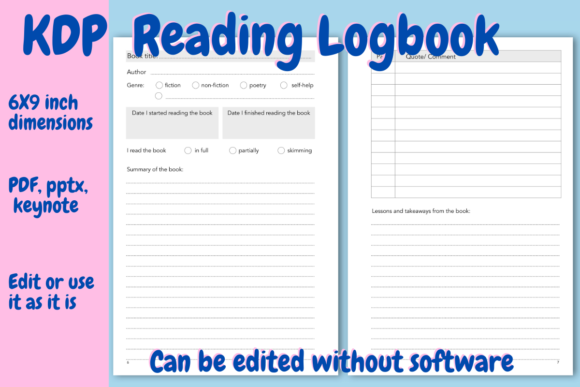
A frequent misunderstanding among new KDP publishers is assuming that any lined notebook qualifies as a reading journal. However, dedicated readers require structured data entry points to track their literary journey effectively. This Reading Logbook for KDP distinguishes itself through a deliberate two-page spread system per book review. Overlooking this layout distinction is a common error that results in generic products failing to compete in a saturated niche.
The left page of this template is engineered for metadata and narrative context. It includes specific fields for the title, author, genre, start and finish dates, and a unique reading status indicator (full, partial, or skimming). Many standard templates omit the "skimming" or "partial" options, forcing users to leave fields blank or write awkward notes. Including these options acknowledges the reality of adult reading habits, where not every book is finished cover-to-cover. Furthermore, the designated summary space encourages active recall, transforming the logbook from a simple list into a learning tool. If you are modifying this template, ensure you do not remove these structured elements in favor of blank lines, as doing so diminishes the product's perceived value.
Optimizing the Right Page for Retention and Reflection
The right page presents another area where creators often misjudge user needs. Instead of endless writing space, this template provides a table specifically formatted for memorable quotes and comments, followed by ample room for lessons and takeaways. A mistake many designers make is prioritizing uniformity over function; they might replace the quote table with standard lines to save time. This reduces usability because readers want to quickly scan for key insights without wading through paragraphs of text.
When using this PDF, PPTX, or Keynote source file, pay close attention to the balance between the quote table and the takeaway section. The current design offers enough vertical space for meaningful reflection without overwhelming the user. If you decide to adjust margins or font sizes, test the writing space physically. Digital previews can be deceptive regarding how much handwritten content actually fits in a 6x9 inch format. Ensuring the "lessons learned" section remains spacious is critical for educators, professionals, and lifelong learners who use this logbook for knowledge management rather than mere entertainment tracking.
Navigating Technical Specifications and Printing Costs
Technical errors are the silent killers of profit margins and quality scores on Amazon. This Reading Logbook for KDP is pre-configured at 6x9 inches with a black and white interior and no bleed settings. These specifications result in a printing cost of approximately $2.15 USD, allowing for a competitive retail price while maintaining healthy royalties. A significant mistake occurs when creators alter dimensions or enable bleed unnecessarily. Adding bleed to a text-heavy interior like a reading log increases printing costs and complicates the formatting process, often leading to rejected files or cropped content.
Before finalizing your upload, verify that your modifications have not shifted the safe zone. The document has been tested on the KDP previewer, but any duplication or deletion of pages requires a fresh check. For instance, if you right-click and duplicate the review spreads to increase the page count beyond 101, you must ensure the total page count remains divisible by two for proper binding. Failing to check this can result in blank end pages or alignment issues that trigger negative customer feedback regarding "wasted paper."
Mastering the Dual Table of Contents System
One of the most overlooked features in this template is the inclusion of two separate tables of contents. This allows users to index books by title alongside the specific page number where the review resides. Beginners often delete one of these TOC pages, assuming redundancy. However, for a logbook intended to grow with the user, having dual indexing pages accommodates higher volumes of reading. If a user fills the first TOC, the second serves as a continuation rather than forcing them to abandon the journal.
When customizing this section, avoid changing the column widths drastically. The current spacing is calibrated for average book titles and three-digit page numbers. Making the columns too narrow frustrates users with long academic or fantasy novel titles, while making them too wide wastes valuable navigation space. Always consider the end-user experience: a reading logbook is a reference tool, and its navigational elements must remain intuitive throughout its lifecycle.
Evaluating Source Files and Customization Safety
This resource is available in PDF, PPTX, and Keynote formats to accommodate different workflow preferences. A critical error arises when users edit the PDF directly for structural changes. While PDFs are excellent for final uploads, they are poor for adding or removing pages. Attempting to manipulate page counts in a PDF editor often leads to layer corruption or inconsistent margins. Always perform structural edits in the native PPTX or Keynote files before exporting to PDF for the final KDP preview check.
Additionally, respect the copyright page placement. The template includes a dedicated copyright page for your brand name. Novice publishers sometimes overwrite this with decorative elements or merge it with the title page to save space. This is a legal and professional misstep. Maintaining a distinct copyright page protects your intellectual property and signals professionalism to buyers. When inserting your brand name, ensure the font size and style match the interior typography to maintain visual cohesion. Inconsistent branding between the cover and interior is a subtle detail that discerning customers notice and mention in reviews.
Strategic Page Management for Target Audiences
The instruction to "right-click and duplicate" or delete pages is powerful but requires strategic foresight. This Reading Logbook for KDP targets a broad demographic, from children to professionals. A common pitfall is creating a "one-size-fits-all" version that satisfies no one. If you are targeting young readers, consider reducing the number of review pages and increasing the frequency of fun, interactive elements or simpler tracking sheets. Conversely, for adult professionals, you might duplicate the review spread to allow for deeper analysis of dense non-fiction.
However, avoid the temptation to create a massive 300-page tome simply because the software allows it. Higher page counts increase the $2.15 base printing cost, which may force you to raise the price above market tolerance for a 6x9 journal. Calculate your royalty per page added. Sometimes, a concise 101-page logbook offers better value perception and profitability than a bloated alternative. Test your pricing strategy against competitors before committing to extensive page duplication.
Final Quality Assurance Before Publishing
Even with a tested template, human error during customization is inevitable. Before hitting publish, conduct a physical proof assessment. Print a sample copy or use the digital previewer to simulate flipping through the book. Check specifically for the alignment of the left and right pages in the review spread. Because this is a no-bleed interior, margins are your primary safety net. Ensure that the binding gutter does not encroach upon the writing space, especially on the left side of the right-hand page. Text or tables disappearing into the spine is the fastest way to receive a one-star review.
Finally, verify that your title page and copyright page flow logically into the dual tables of contents. The user journey should be seamless: identify ownership, navigate to a blank entry, record data, and reflect. By treating this Reading Logbook for KDP as a functional product rather than just a collection of pages, you align your offering with actual reader needs. This attention to detail, combined with adherence to technical specifications, transforms a simple template into a sustainable asset for your publishing portfolio.