KDP Interior: Custom Meeting Notes Template
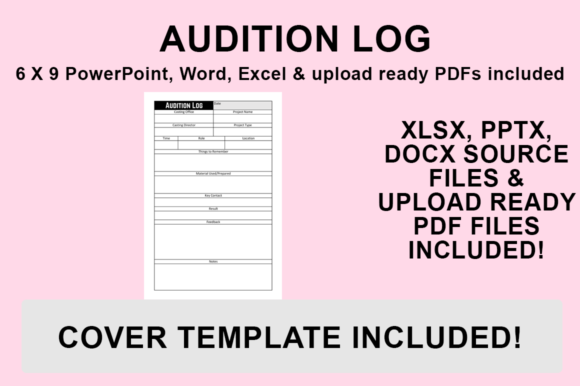
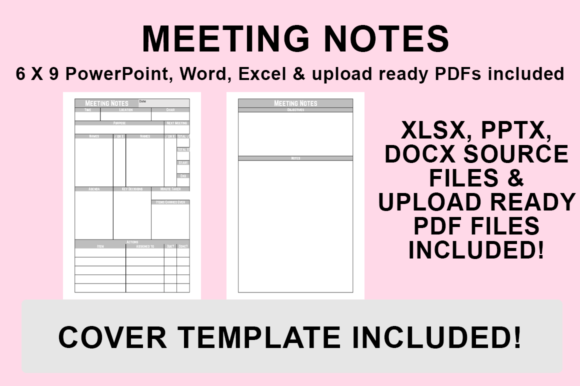
Creating a low-content book that actually sells on Amazon requires more than just uploading a generic lined notebook. Readers and professionals are increasingly searching for functional tools that solve specific organizational problems. The KDP Interior - Meeting Notes template addresses this demand by providing a structured, professional foundation for capturing ideas, action items, and strategic discussions. Unlike standard journals, this interior is engineered specifically for the 6″x9″ trim size with no bleed, ensuring that your final product looks crisp and intentional when printed. Whether you are publishing under your own imprint or creating branded merchandise for a corporate client, having editable source files in PowerPoint, Word, and Excel transforms a static PDF into a versatile design asset.
Elevating Professional Perception Through Editorial Design
The visual personality of a meeting notes journal communicates value before the user even writes a single word. When utilizing the KDP Interior - Meeting Notes files, you are not locked into a single aesthetic. The inclusion of editable source documents allows you to apply modern typography principles that align with specific brand identities. For entrepreneurs and marketers, the choice between a clean sans serif font and a traditional serif font can drastically alter how the book is perceived. A minimalist sans serif typeface often suggests efficiency and tech-forward thinking, making it ideal for startup founders or digital agencies. Conversely, a classic serif or even a refined script font for headers can lend an air of established authority, suitable for legal consultants, executive coaches, or luxury planners.
This level of customization directly influences readability and visual hierarchy. In editorial design, white space is just as important as the ink on the page. By adjusting margins and line spacing within the provided Word or PowerPoint templates, you ensure that the writing prompts do not feel cramped. This attention to detail improves audience engagement because the user feels the tool was designed with their cognitive load in mind. A cluttered interior leads to abandoned notebooks, while a thoughtfully spaced layout encourages consistent use. When you treat the interior as a premium font showcase and a functional workspace simultaneously, you elevate the perceived value of the physical product far beyond its printing cost.
Strategic Font Pairing and Brand Consistency
One of the most significant advantages of receiving source files rather than a flat PDF is the ability to execute proper font pairing. Effective branding relies on consistency, and your KDP publication should be an extension of that identity. If you are creating a series of business notebooks, the typeface used in the KDP Interior - Meeting Notes should complement your logo design and web presence. You might choose a bold display font for section dividers to create clear navigation points, paired with a highly legible body font for the note-taking areas. This contrast guides the eye and establishes a rhythm throughout the book.
For content creators and bloggers repurposing their digital brand into print products, this template serves as a bridge between online and offline experiences. You can incorporate specific graphical elements or color accents (keeping in mind KDP’s black and white interior limitations) that mirror your social media graphics or packaging design. The Excel component is particularly useful for those who want to generate data-driven layouts or repetitive tables with mathematical precision before importing them into the final document. This flexibility ensures that the commercial font choices you make are not just decorative but serve a structural purpose, reinforcing recognition every time the book is opened.
Practical Customization and Export Workflow
Transitioning from a customizable template to a print-ready file requires a methodical approach to avoid common formatting errors. Since the KDP Interior - Meeting Notes is designed with no bleed at 6″x9″, you have a safe zone that simplifies the upload process, but precision is still key. Follow this workflow to ensure your customized file meets Amazon’s technical standards:
- Open and Customize: Launch your desired source file (PowerPoint, Word, or Excel). Update the fonts to match your brand guidelines, adjust header styles, and add any proprietary graphics or logos. Ensure all text remains within the safe margins.
- Navigate to Save Options: Once your design adjustments are complete, go to the ‘File’ menu and select ‘Save As’. Do not use ‘Export’ unless necessary, as ‘Save As’ often provides more granular control over PDF standards in certain software versions.
- Select Destination: Choose a dedicated project folder for your KDP assets to keep your source files and final outputs organized.
- Choose PDF Format: From the ‘Save as type’ dropdown menu, strictly select PDF (.pdf). Avoid JPEG or PNG formats, as these can introduce compression artifacts and resolution issues unsuitable for print.
- Finalize and Verify: Click Save. Before uploading to KDP, open the new PDF to verify that your custom fonts have embedded correctly and that the page size remains exactly 6″x9″.
Maximizing Commercial Value Across Niches
The versatility of this template extends beyond simple note-taking. Creative professionals can adapt the KDP Interior - Meeting Notes into specialized tools such as client intake forms, project trackers, or brainstorming journals. For hobbyists and crafters, the structured layout can be modified to track patterns, supply inventories, or project timelines. Because you possess the source files, you are not limited to a single product; you can create an entire ecosystem of related interiors that share a cohesive visual language.
When evaluating project fit, consider the end-user's environment. A field researcher needs high-contrast, utilitarian typography that is easy to read in varying light conditions. A wedding planner might prefer elegant script fonts and softer lines that evoke celebration and organization. Testing these variations is straightforward when you have editable assets. You can print sample pages at home to assess tactile readability and line weight before committing to a full proof. This iterative design process separates amateur publishers from professional brand strategists.
Furthermore, owning the source files mitigates licensing risks associated with some pre-made interiors. By customizing the template with your own licensed commercial fonts and original graphics, you create a unique derivative work. This distinctiveness is crucial for standing out in a saturated marketplace. It also protects your intellectual property, as your specific combination of layout, typography, and branding becomes identifiable to your audience. Whether you are a small business owner creating internal training materials or a self-publisher building a passive income stream, treating the KDP Interior - Meeting Notes as a foundational design system rather than a disposable template unlocks long-term scalability and professional credibility.
Ultimately, success in low-content publishing hinges on utility and aesthetics working in tandem. By leveraging the editable nature of these PowerPoint, Word, and Excel files, you ensure that every page serves a purpose and reflects a deliberate design strategy. The result is a product that users trust, return to, and recommend, driving organic growth through genuine satisfaction rather than marketing hype.